Proton Pass for Business
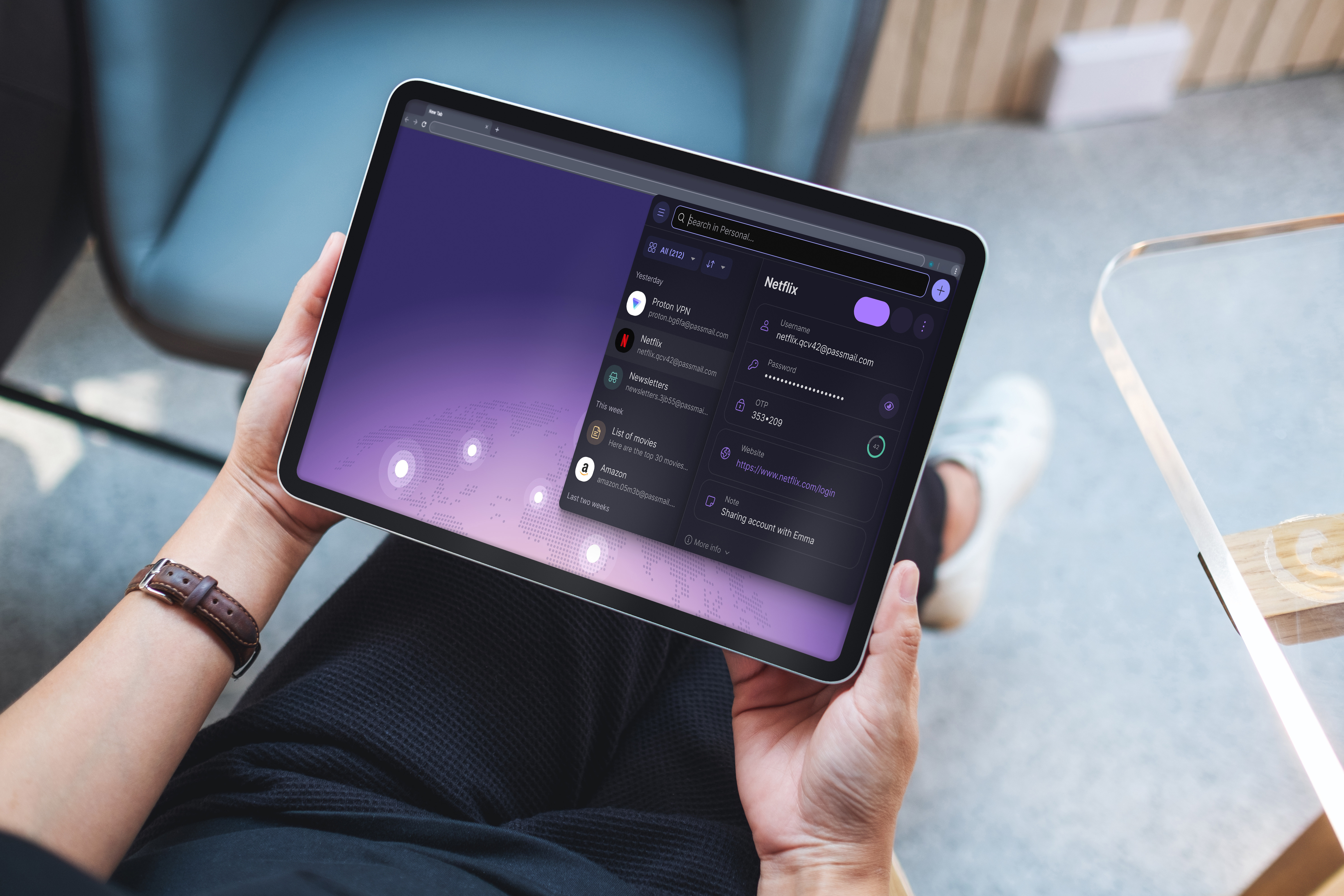
Proton Pass for Business is the team tier of Proton’s password manager. The vault is zero-knowledge (zero-access encrypted, meaning Proton itself cannot read your credentials) and packaged for teams that need SSO, SCIM provisioning, audit logs, and centralized policy enforcement.
Two things set Proton Pass Business apart from 1Password Business and Bitwarden Teams. First, Proton is a Swiss provider. Proton AG is headquartered in Geneva, data sits in Zurich and Frankfurt data centers, and invoices can be paid by bank transfer in CHF. For Swiss SMEs that matters more than any feature bullet. Second, Hide My Email aliases ship with every seat via the SimpleLogin integration Proton acquired in 2022. Curious how the rest of your tools compare? Check in two minutes which of your SaaS tools fall under the US CLOUD Act.
How comprehensively each provider encrypts metadata varies. With Proton Pass, vault names, item titles, tags, and the sharing structure are end-to-end encrypted alongside the credentials themselves (so, for example, the fact that the “Finance” vault is shared between the CFO and accounting with read access stays encrypted alongside the passwords inside it).
Proton Pass is younger than the incumbents and shows it in a few places, flagged below.
What Proton Pass for Business does
Each user gets encrypted vaults for passwords, passkeys, TOTP codes, credit cards, identity notes, and (on Professional) file attachments up to 100 MB per item. Admins provision users via SAML 2.0 SSO or SCIM, enforce 2FA, share vaults with granular view, edit, and manage permissions, and review activity logs from a web-based admin panel. Hide My Email aliases, built on the SimpleLogin engine Proton acquired in 2022, are included for every seat.
The architecture is where Proton Pass diverges from most team password managers. Vault keys are derived from each user’s password on their own device. Proton’s servers never see decryption keys, and the metadata (vault names, item titles, tags, shared structure) is encrypted alongside the credential contents. A server-side breach or a court order would yield encrypted blobs regardless of where the request originated.
Who Proton Pass for Business is for
- Swiss SMEs and DACH teams already on Proton who want credentials, email, calendar, and files under one admin panel with Swiss jurisdiction. Proton Business Suite bundles Pass with Mail, Drive, Calendar, and VPN, and the combined price is lower than stitching individual tools together.
- Privacy-conscious teams with nFADP compliance requirements. Zero-access encryption directly supports the “appropriate technical and organizational measures” standard in Art. 8 nFADP, and Swiss bank transfer billing removes a real procurement friction point for Swiss finance departments.
- Small teams of 3 to 50 people that need SAML SSO and SCIM without the 1Password premium. Proton Pass Professional sits below 1Password Business per seat once bundled with other Proton services, and enterprise identity features are available at the Professional tier rather than gated behind a custom-quote Enterprise plan.
- Journalists, NGOs, and activist organizations whose password manager’s jurisdiction matters for the same reasons Proton Mail’s does. Proton has a documented record of pushing back against data requests where Swiss law does not compel compliance.
Try Proton Pass for Business →
Key features
Zero-access encryption across the entire vault
Every item in your vault is encrypted with a key derived from the user’s password. The cryptographic principles mean Proton itself can never see the unencrypted contents. This is a substantial advantage over a setup that relies only on access policies and provider promises. Beyond the passwords themselves, Proton Pass also encrypts metadata (vault names, item titles, tags, sharing structure) end-to-end. A server-side breach or a court order would yield only encrypted blobs across both the credentials and the directory of what your team logs into.
The clients are open source across desktop (Windows, macOS, Linux), browser extensions (Chrome, Firefox, Edge, Safari), and mobile (iOS, Android). Berlin-based Cure53 audited the full system in 2023 and rated the overall security posture “commendable.” All reported issues were fixed except one edge case in Android autofill that under certain circumstances enables subdomain-spoofing attacks. Proton has stated the cause sits in the Android operating system and cannot be resolved at the application level.
A second independent audit by Recurity Labs, published in May 2026, covered the browser extensions, desktop and mobile applications, and the CLI. Recurity rated Proton Pass “well above par,” found no remote exploits and no encryption bypasses, and noted several memory-handling observations on desktop, all of which Proton resolved before retest. The full report is published on Proton Drive.
SSO, SCIM, and admin controls (Pass Professional)
Pass Professional adds SAML 2.0 SSO with Microsoft Entra ID, Okta, Google Workspace, and Cisco Duo, plus SCIM user provisioning with Entra ID and Okta. Admins can enforce 2FA org-wide, require passwords to meet policy before they are saved, and review activity logs through the admin panel. SIEM integration streams logs to Splunk, Elastic, or similar. A command-line interface (CLI) is available for automation.
What is not offered is native LDAP or direct on-premises Active Directory integration. If your team authenticates against on-prem AD without an identity provider in front of it, Proton Pass Business is a hard fit. Duo SSO is the cleanest workaround because it can bridge on-prem AD to SAML for Proton.
Hide My Email aliases
Every seat gets unlimited disposable email aliases, generated by the SimpleLogin backend Proton acquired in 2022. Sign up for vendor portals, SaaS tools, or one-off services with an alias like [email protected] that forwards to the user’s real inbox. If an alias attracts spam or the vendor gets breached, disable it with one click. This shields your domain and your real address effectively against phishing and against leaked vendor lists.
Alias domains rotate across passmail.net, passinbox.com, slmail.me, and aleeas.com depending on the account. Bidirectional sync with SimpleLogin lets users manage aliases from either interface without drift.
Passkey and TOTP storage
Proton Pass stores passkeys and TOTP seeds alongside passwords, syncs them across devices, and offers autofill on browsers and mobile. The trade-off is familiar. Storing passwords and TOTP codes in the same vault means a compromised vault exposes both factors. Proton mitigates this with three layers. Proton Sentinel monitors account access, the Proton account itself can be secured with a hardware key, and the optional Extra password protects the Pass vault on top of the account login (see section below). For high-value accounts (primary email, banking, admin logins) we still recommend keeping TOTP in a dedicated authenticator like Ente Auth or Aegis.
Bulk migration of existing TOTP secrets from Google Authenticator is not supported directly. The documented workaround is to export through 2FAS Auth as an intermediary.
File attachments and vault sharing
On Pass Professional, each vault item can carry file attachments up to 100 MB. Vaults share with up to 10 people each at view, edit, or manage permission levels. Professional users get up to 50 vaults per seat.
What is missing compared to 1Password Business is a nested folder hierarchy inside vaults. Sharing is flat at the vault level, which works at 5 people and gets harder to organize cleanly at 50.
Proton Sentinel (advanced account protection)
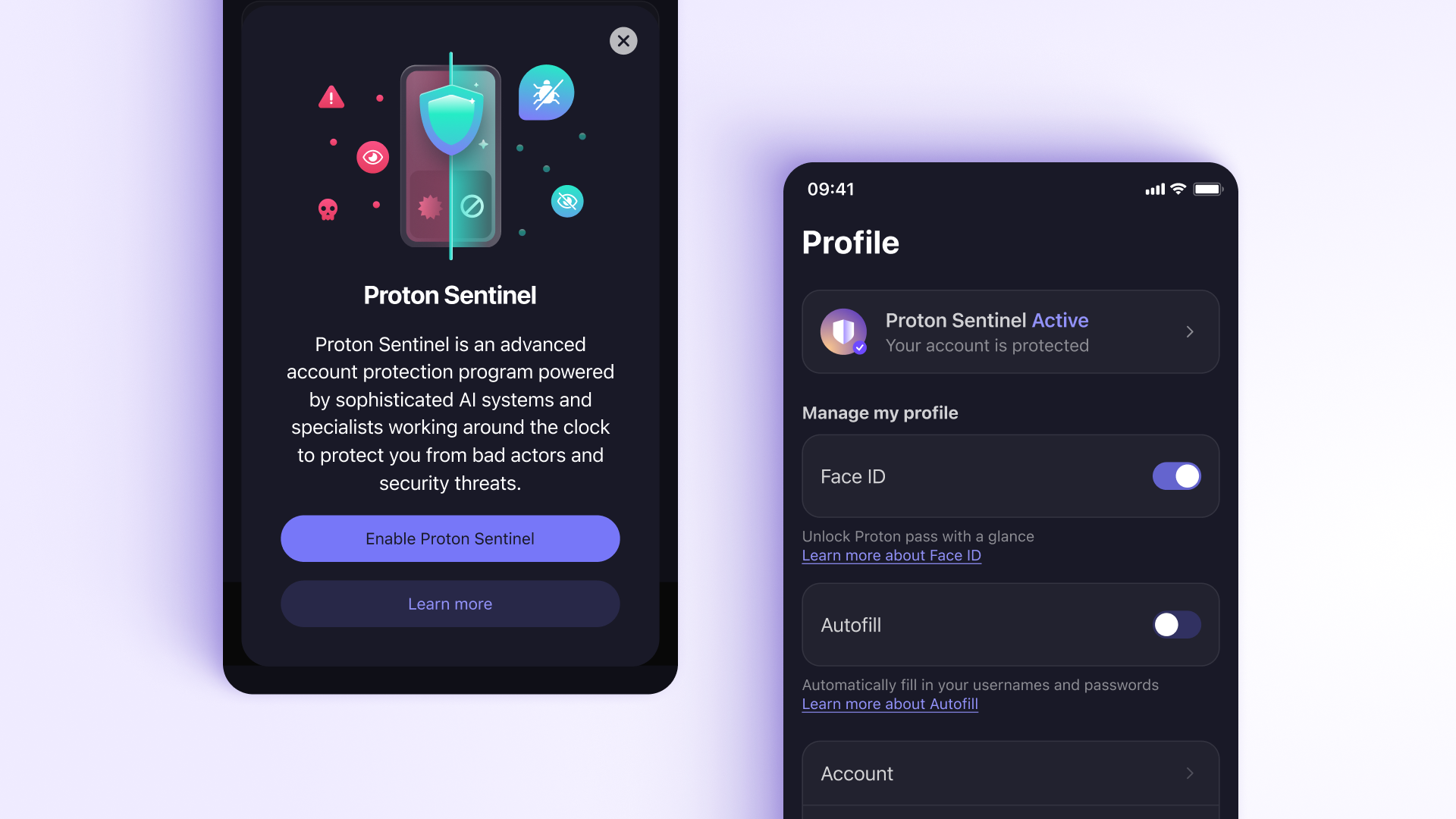
Proton Sentinel is the account protection layer that sits above Proton Pass and covers every service tied to the same Proton account (Pass, Mail, Drive, VPN). It monitors login attempts, blocks suspicious access (unusual devices, locations, or behavioral patterns), and sends breach alerts when credentials matching your aliases appear on known leak databases. The login history log is worth checking once a week, especially after onboarding new team members or enabling new integrations.
The Watchtower equivalent from 1Password (vault hygiene, reused and weak passwords, items in known breach lists, and 2FA coverage gaps) is filled by Pass Monitor inside Proton Pass itself. Pass Monitor flags compromised credentials, weak or reused passwords, and logins without 2FA, and sends real-time alerts when one of your addresses appears in a data breach. Sentinel and Pass Monitor complement each other. Sentinel covers active account defence (blocking suspicious logins in real time, surfacing unusual devices and locations), Pass Monitor covers vault hygiene.
Both layers are included with paid Proton accounts at no extra cost. For a business deployment it becomes a small but useful defensive layer, because admins reviewing login history and breach alerts see unusual activity before it turns into a credential incident.
Extra password
Proton Pass can sit behind an Extra password, a second credential that stacks on top of the Proton account password and is required every time the vault opens. This exists because Proton is an ecosystem: one Proton account unlocks Mail, Drive, Calendar, VPN, and Pass in a single session. Convenient for the user, but it also means the account password is a single point of failure across every Proton service. Dedicated password managers like 1Password and Bitwarden do not face this problem because their master password only protects the vault.
The Extra password closes that gap. If the Proton account password is compromised through credential stuffing or reuse, the attacker gains Mail, Drive, and Calendar but still cannot reach vault contents without the separate Extra password. Opt-in per user, configured under Security settings.
Emergency Access
Emergency Access matters in critical situations like an unplanned hospital stay, a lost device, or in the worst case a death, so operations can continue.
Every user can designate up to five trusted contacts who can request access to the account after a configurable waiting period (days to months). The waiting period gives the account owner time to cancel the request if it was unexpected. Zero-knowledge encryption is preserved throughout. Keys pass through Proton only in encrypted form, and access can be revoked at any time.
For single-person shops, a trusted accountant or spouse with a long waiting period is the lower-stress version of keeping printed recovery sheets in a safe.
The feature requires a Proton email address on the account, so VPN-only or Pass Plus users with external email addresses cannot currently use it.
Migration from 1Password, Bitwarden, LastPass, and KeePass
Proton Pass imports from 1Password (1PUX format), Bitwarden (JSON), LastPass (CSV), NordPass, and KeePass (XML). According to feedback from the online community, standard logins transfer reliably during migration. TOTP seeds are trickier. From Bitwarden, the JSON export carries them through in full, but with other sources that is not consistently the case. Common gotchas are secondary passwords stored under a single login entry (dropped on import) and LastPass identity profiles (no equivalent structure in Proton Pass). Existing folder hierarchies, for example from 1Password, are not preserved either; items land in a default vault and must be reorganized manually.
What Proton Pass for Business does not do
- No native LDAP or direct on-premises Active Directory integration. Bridge through Entra ID, Okta, Google Workspace, or Duo SSO. Teams still running on-prem AD without an identity provider will need to add one first.
- No travel mode. 1Password’s ability to temporarily hide vaults at border crossings is absent. Relevant for journalists, activists, or anyone crossing borders with sensitive credentials on their device.
- No nested folder hierarchy inside vaults. Vault sharing is flat. Fine for small teams, less clean at 30+ people managing dozens of shared credential contexts.
- No biometric unlock for the browser extension yet. Desktop (Touch ID, Windows Hello) and mobile (Touch ID, Face ID) biometric unlock work. The browser extension has been on the roadmap since Winter 2024 and is still not shipped as of April 2026; the extension falls back to PIN or password auto-lock.
- No direct import for Google Authenticator. Bitwarden JSON exports carry TOTP seeds through cleanly and import natively. Google Authenticator’s proprietary QR-code export needs a detour through 2FAS Auth as an intermediary.
- Android autofill reliability is inconsistent. The most consistent complaint in user feedback through 2025 and early 2026. Credential suggestions and save prompts can fail on non-standard forms. Pilot with Android-heavy teams before committing.
- No live chat support. Support is documentation and ticket-based. Response times are reasonable but there is no real-time escalation channel for enterprise customers.
Pricing
Proton Pass for Business comes in two tiers. Pass Essentials covers vault sharing, the admin panel, and unlimited password storage. Pass Professional (minimum 3 users) adds SAML SSO, SCIM provisioning, SIEM integration, activity logs, file attachments, the CLI, and enterprise policies. Pass Professional is also bundled into Proton Business Suite alongside Mail, Drive, Calendar, and VPN under a single admin panel, which is the better value if your team is standardizing on Proton for more than just credentials.
Billing is available annually or monthly (annual is cheaper), and currencies include CHF, EUR, and USD. Bank transfer invoice payment in CHF is available alongside card. This removes a common procurement friction point.
Check Proton Pass Business pricing for current rates.
How Proton Pass for Business compares
| Proton Pass Business | 1Password Business | Bitwarden Teams | |
|---|---|---|---|
| Jurisdiction | Switzerland | Canada | USA |
| Open source | Yes (all clients) | No | Yes |
| SAML SSO | Yes (Professional) | Yes | Yes |
| SCIM provisioning | Yes (Entra, Okta) | Yes | Yes |
| Native LDAP / on-prem AD | No | No (SSO only) | Yes (self-host) |
| Travel mode | No | Yes | No |
| Passkey support | Yes | Yes | Yes |
| Hide My Email aliases | Included (SimpleLogin) | Integration only | Integration only |
| Emergency access (trusted contacts) | Yes | Yes | No |
| CHF bank transfer | Yes | Sales-negotiated | Sales-negotiated |
| Best for | Swiss SMEs, Proton ecosystem, jurisdiction-sensitive teams | Mature admin features, developer-heavy teams | Budget-conscious, open-source, self-host option |
For a side-by-side comparison against 1Password, Bitwarden, and NordPass for SMEs, see our Password Managers for SMEs comparison. For broader context on where a password manager sits in a Swiss security stack, see VPN and Password Manager: Which Ones Are Actually Worth Paying For?
Swiss relevance (and its limits)
Proton AG is headquartered in Geneva and primarily subject to Swiss law. Vault data is distributed across data centers in Zurich (Switzerland) and Frankfurt (Germany), both operated by Proton AG directly. Switzerland has no direct equivalent of the US CLOUD Act (Clarifying Lawful Overseas Use of Data Act), and EU adequacy status means data stored with Proton is treated as intra-EU from a GDPR perspective, so Standard Contractual Clauses are not required when serving EU clients.
For Swiss SMEs subject to the nFADP, a zero-knowledge password manager directly supports the Art. 8 nFADP requirement to implement “appropriate technical and organizational measures,” because the cryptographic model means even a successful legal process against Proton cannot yield readable credentials. The bank transfer billing option in CHF removes the procurement friction of dollar card payment, which is a genuine advantage for Swiss finance departments and tender processes.
From a Swiss perspective, there is an interesting SPIE Switzerland case study (headquartered in Wallisellen) that Proton published. It describes how SPIE moved its 400-person Swiss office from KeePass to Proton Pass. The migration experience is useful for anyone planning a similar move, and SPIE is a named, verifiable Swiss reference rather than an anonymised quote.
Swiss jurisdiction is not blanket immunity, and we owe readers the nuance:
- Swiss courts can compel metadata logging. Where Swiss law permits, Proton complies with valid court orders, which can include logging metadata (IP addresses, connection timestamps) for specific accounts under targeted investigation. Vault contents stay encrypted; access patterns are not.
- Frankfurt data center sits under EU jurisdiction. German and EU law applies to that infrastructure, not Swiss. For customers whose compliance framework requires data to remain strictly within Switzerland, this is a question to raise with Proton sales and to document in the DPA before signing.
- VÜPF is a real regulatory pressure. A proposed amendment to Switzerland’s Ordinance on Surveillance of Postal and Telecommunications Traffic would require providers with more than 5,000 users to retain metadata for six months. Proton has publicly stated the Swiss regulatory environment is currently hostile and has begun relocating parts of its infrastructure. See our Proton Mail guide for the fuller picture. Worth watching if jurisdiction is a primary purchase driver.
- What does not change is the structural guarantee. Vault contents remain zero-knowledge encrypted with keys Proton does not hold, regardless of which jurisdiction applies.
Tips for getting the most out of Proton Pass for Business
- Pilot on Android first if you have Android-heavy users. The unreliable Android autofill should not be underestimated. Test with a few people before starting the full rollout.
- Bridge on-prem AD through Duo SSO. If you are still running local Active Directory without Entra ID or Okta, Duo SSO is the most direct path to Proton Pass without a full identity provider migration.
- Budget enough time for the migration. Folder structure does not carry over, and LastPass identity profiles have no equivalent. Plan vault structure before importing where possible.
- Use Hide My Email aliases for every vendor signup. Treat alias creation as the default when onboarding a new SaaS tool. When the vendor gets breached, you disable the alias without touching the employee’s real inbox.
- Enforce hardware keys on admin accounts. The Proton admin panel controls vault provisioning for the entire team. Protect it with a hardware key rather than an in-vault TOTP.
- Consider Proton Business Suite if you are already paying for two or more Proton services. The bundle is usually cheaper than individual subscriptions and consolidates admin under one panel.